- Home
- Departments
- Public Works
- Utility Operations
- Utility Billing
Utility Billing
The Customer Service staff prepare monthly bills for over 23,000 customers for water, wastewater, storm water, street lights, recycling, and solid waste collection services. Bills are produced on a cycle basis, on or around the 10th, 20th and 30th of each month. Bills are due 15 days after the cycle billing date.
Before You Move
Owners, contact Utility Billing Customer Service at 701-355-1700, option 1, to schedule a date to discontinue services. A reading from our auto read system will capture the water usage if you are connected to the system.
Renters will need to have the property owner or manager contact Utility Billing Customer Service at 701-355-1700, option 1, or use the appropriate online form to schedule a date to discontinue services.
Purchasing a Residential or Commercial Property
The form should be received in the office prior to the day you want services put into your name.
Adding or Removing a Tenant from a Property
The form should be completed by the Property Owner or Property Manager and received in the office prior to adding or removing a tenant from a property.
Setting up service outside Bismarck City Limits
Outside of City of Bismarck limits:
South Central Regional Water District
701-258-8710
Lincoln ND residents
City of Lincoln
701-258-7969
City of Bismarck Utility Bill Payment Options:
Online Payment
- The Payment Portal includes automatic payment setup, once an online account profile is created.
- Online account setup instructions, and automatic payment setup instructions: Online Account Setup.PDF
Pay by Phone
Call 701-355-1700, option 6. Please note: Pay by Phone is an automated phone menu. For compliance and security reasons, Utility Billing Customer Service Representatives are not able to take payments directly over the phone.
Bank Draft
Use the Bank Draft Form to setup your account for automatic payment via checking or savings account. See image below for routing and account number locations on checks.
Mail Payment
City of Bismarck Utility Billing
PO Box 5555
Bismarck ND 58506-5555
Walk-In Payments
City of Bismarck Utility Billing Office
601 S. 26th St.
Bismarck ND 58504
Phone: 701-355-1700, option 1
Business Hours: Monday through Friday from 8:00 am to 5:00 pm, except the first Tuesday of each month from 8:00 am to 4:30 pm
Business offices are closed on holidays. Holiday Closure Calendar.pdf
Drop Box Locations
- Family Fare Grocery Stores:
- 835 S. Washington Street
- 1190 W. Turnpike Avenue
- 3103 Yorktown Drive
- Capitol Building (600 E Boulevard Avenue, near the mail room)
- Public Works Building (601 S. 26th Street has a drive-up drop box)
Utility Bill Charges Breakdown.pdf
Utility Rate Schedules
- 2026 Single Family Rates.pdf
- 2026 Multi Family Rates.pdf
- 2026 Non-Residential Rates.pdf
- 2026 Rates Scenarios.pdf
- 2026 Bill Estimator - Requires Microsoft Excel
Other Charges
Fees
| Description of charge | Rate |
| Turn off/Turn on with 24 hour notice | No Charge |
| Turn off/Turn on with same day service | $50.00 |
| After hours turn on/turn off at curb stop | $100.00 |
| Install or remove lawn meter | $50.00 |
| Meter check | $50.00 |
| Returned payment fee | $30.00 |
| Delinquent turn on service fee During normal business days and hours Monday through Friday, 8:30 am through 5:00 pm. | $75.00 |
| Delinquent turn on service fee Outside of normal business days and hours Monday through Friday, 8:30 am through 5:00 pm. | $150.00 |
Water Analytics
City customers are encouraged to be aware of their water consumption. Water Analytics software is available to all City of Bismarck customers free of charge, and shows customers their water usage by year, month, day, and hour. Using Water Analytics, City of Bismarck customers are also able to sign up to receive notification alerts by text or email.
Register as a new user to set up your Water Analytics account or to log into an existing account. You will need your utility billing account number and water meter number to create a new account.
Water Analytics does not work with the Microsoft Edge browser.
Water Analytics Sign Up & Help.pdf
Water Consumption
Water consumption may vary for many reasons:
- The number of people may be living in the household.
- During the summer, higher water consumption may be a result of outdoor watering for lawns and gardens, filling pools, washing vehicles, or an leaving an outdoor faucet running.
- Leaky plumbing, such as toilets, sinks, outside sprinklers, washers, hot water heaters often cause increased water use.
- Toilet leaks are the most common and are hard to see or hear. A slowly leaking toilet can waste roughly 7.48 gallons per hour; a flap that is stuck fully open can lose 400 gallons per hour.
Water Usage for Everyday Tasks
- Shower: 25 to 50 gallons (5 to 10 gallons per minute)
- Bath: 36 gallons (full tub)
- Toilet flush: 5 to 7 gallons
- Dish washing: 10 to 20 gallons (tap running)
- Automatic dishwasher: 10 to 12 gallons (full cycle)
- Clothes washer: 30 to 60 gallons (full cycle)
- Outdoor watering: 5 to 10 gallons per minute
Outdoor Water Use Schedule
Help us balance our summer water use. Use your house number to pick the watering days.
| Watering Days | Description |
|---|---|
| Monday and Thursday | Even Numbered Homes & Businesses |
| Tuesday and Friday | Odd Numbered Homes & Businesses |
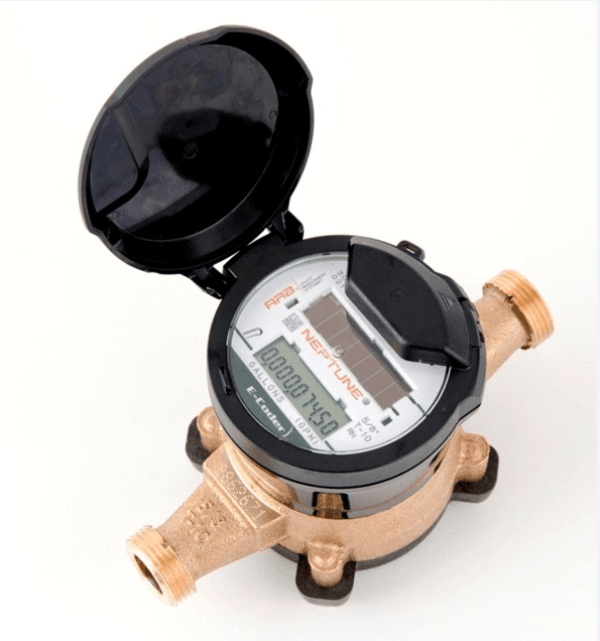 How to Read Your Water Meter
You will need an LED flashlight to read your meter if your meter register is digital (as pictured).
Shine the LED flashlight on the top rectangular window of the meter register. As you do so, the bottom rectangular display panel will alternate between the meter reading and the rate of flow every six seconds. The meter reading will display nine digits and look like the following:
- Water meter size 5/8”, ¾” or 1” will look like 000000.000 (bold digits indicate current meter reading)
- Water meter size 1 ½” and 2” will look like 0000000.00 (bold digits indicate current meter reading)
- You are billed per unit. 1 unit = 100 cubic feet =748 gallons
Testing Your Water Meter
Some customers feel a water meter not working properly causes their high water bills. To test the accuracy of your meter, use the following procedure.
- Run water until the last three digits on your meter reading are all zeros.
- Fill a one-gallon container with water.
- The last three digits on your meter should read .133 or .134 cubic feet.
Check for Leaks
The "RATE" indicator that flashes on the display panel of your water meter shows the rate of water flow measured in cubic feet per minute.
If no one in the home/building is drawing water and you have all zeros showing on the rate that would indicate you have no water going through the meter at that time.
If there are numbers other than zero this would indicate you have water flowing through the meter.
- If you have water flow and you are not using water you will need to check all your plumbing fixtures, i.e., toilets, sinks, outside sprinklers, washer, hot water heaters etc.
- You can shut off the valves that supply each fixture, one by one, and check the rate indicator after each shut off.
- When closing a valve changes the rate to all zeros, you have found the location of the leak. There may be more than one leak.
Toilet leaks are the most common and are sometimes hard to see or hear.
- A major toilet leak can waste 800 cubic feet of water a day.
- Be sure to check all toilets at the property.
- Put food coloring or something with color in the toilet tank and wait 10-20 minutes. Do not flush the toilet during this time.
- If the coloring appears in the toilet bowl, there is a toilet leak.
- If you hear the toilet refilling and no one has used it, there is a leak.
- Repair leaks promptly or leave the valve off until it can be fixed by yourself or a plumber. Leaks cost money.
- Once a leak is repaired, check the rate indicator again and make sure it is showing zeros. You may have another leak.
Location: 601 South 26th Street, Bismarck, ND
Phone: 701-355-1700, option 1
Mailing Address: PO Box 5555, Bismarck, ND 58506-5555